
You may be able to see that people are finding your website. They are clicking through from Google, social media, a referral, an ad, or a link you shared somewhere. They may visit a few pages, spend some time looking around, and then leave.
But they are not reaching out.
Or they are reaching out only occasionally.
Or the inquiries you do get are vague, poorly matched, or from people who still do not really understand what you offer.
When that happens, it is easy to assume the answer is more traffic.
More SEO. More content. More social media. More ads. More people coming through the door.
And sometimes that really is the answer. But sometimes the people are already getting there. They just are not being given enough help figuring out what to do once they arrive.
Before you spend more time trying to get more people to your website, make sure the people already arriving have a clear path toward action.
One possible solution is an interactive lead tool – a guided website experience such as a website quiz, service matcher, assessment, recommendation tool, or lead qualification form.
Traffic and leads are not the same thing
Website traffic tells you that someone made it to your site but it does not tell you that they understood what you do, recognized themselves in your message, knew which service fit, felt ready to contact you, or trusted the next step enough to take it.
A visitor can be genuinely interested and still leave without doing anything.
This does not automatically mean your website is terrible, your offer is bad, or nobody wants what you sell.
It may simply mean there is too much space between:
“I’m interested.” and “I know what to do next.”
They may be wondering:
- Is this actually for someone like me?
- Which service am I supposed to choose?
- Am I ready for this yet?
- What happens after I fill out the form?
- Am I going to be pushed into booking or buying?
- Do I need to know exactly what I want before I reach out?
- Is my problem too small, too complicated, or outside the scope of what this business does?
Every unanswered question gives the visitor another reason to pause, put the decision off, or leave the site altogether.
They may open three service pages in separate tabs, compare them for a few minutes, and still not know which one they are supposed to ask about.
They may begin typing a message into your contact form, realize they do not know how to explain what they need, and close the page.
They may fully intend to come back later. Most do not.
Traffic problem
The right people are not reaching the website in meaningful numbers.
Possible signs:
- Very few relevant visits
- Little visibility in search
- Few referral or social clicks
- Important pages receive almost no traffic
Conversion or client-journey problem
Relevant people are arriving, but the website is not helping enough of them understand or act.
Possible signs:
- Service pages receive visits but few inquiries
- Visitors compare several pages without choosing
- Contact-form messages are vague
- People repeatedly ask which service they need
- Prospects show interest but hesitate
You may have a conversion or client-journey problem
A traffic problem means the right people are not finding the website.
A conversion or client-journey problem means they are finding it, but the website is not helping enough of them move forward.
That is a very different problem.
It also does not necessarily mean the site is badly designed. A website can look polished, professional, and completely legitimate while still asking visitors to figure out too much on their own.
You may have a conversion problem if:
Wrong-service inquiries
Too few well-matched leads
Browsing without action
Confusion between services
Hesitation before booking
Vague contact messages
Repeated early questions
Service-page visits without inquiries
These are often signs that the website needs to provide more guidance, not necessarily attract more people.
What should you fix before chasing more traffic?
Before you put more time or money into getting people to the website, look closely at what happens after they arrive.
Can they quickly understand what you do?
Can they tell who you help?
Can they recognize the problem you solve?
Can they see a next step that makes sense for where they are right now?
The answer does not have to be a complete website overhaul. Sometimes a few important changes can make the path much easier to follow.
01.
Make the main message clearer
A visitor should not have to study your website to understand your business.
They should be able to quickly tell:
- Who you help
- What you help them with
- What kind of outcome you provide
- What they can do next
Clear does not mean boring.
It also does not mean you cannot have personality, warmth, creativity, or beautiful wording.
It simply means the visitor should not have to translate clever language, broad promises, or industry terminology before they can understand whether they are in the right place.
A person can like your website and still have no idea how to become a client.
02.
Use more specific calls to action
Buttons like “Learn More,” “Get Started,” and “Contact Me” are common, but they do not always tell the visitor what will happen next.
A more specific call to action gives them a reason to click and helps the action feel safer.
For example:
- Find the Right Service for Your Business
- See Which Option Fits Your Needs
- Take the Website Lead Path Assessment
- Request a Tool Fit Session
- Get a Personalized Recommendation
- Tell Me What Is Not Working
The goal is not to make every button long or overly detailed.
It is to make the next step clear enough that the visitor is not clicking into the unknown.
03.
Give every important page a logical next step
Visitors should not reach the bottom of an important page and have nowhere obvious to go.
A service page might lead to:
- A booking page
- A short assessment
- A service comparison
- A relevant case study
- A useful resource
- A lower-pressure inquiry option
- A recommendation tool
The next step should make sense in relation to the page they just read.
Someone reading about a specific service may be ready to inquire.
Someone reading an educational article may still be trying to understand the problem.
Someone comparing options may need help deciding.
Not every visitor is ready to book a call right now. That does not mean they are not interested or that they will never become a good client.
It may simply mean the website needs to give them another step between “just looking” and “let’s talk.”
04.
Make your services easier to understand
A lot of service-based businesses offer several options. From your side of the business, the differences may feel obvious because you know the work inside and out.
Your visitors do not.
They may see three packages, four services, and a few add-ons without understanding which service fits their situation or how the options differ.
They may not know whether they need support, strategy, a full project, a smaller service, or something they have not even seen listed yet.
When choosing feels confusing, people often do one of three things:
- They choose the wrong option.
- They send a vague message asking you to explain everything.
- Or they leave without choosing anything.
Your website should not expect them to arrive already knowing how your business is organized. It should help them understand the difference between your offers and which type of situation each one is meant to solve.
05.
Create a lower-pressure pathway
Some people need more information before they are ready to talk to you directly.
If the only options on the website are “Book a Call” or “Contact Me,” they may leave even though they are interested.
A lower-pressure next step could be:
- A short quiz
- A readiness assessment
- A service matcher
- A useful guide
- A personalized recommendation
- A newsletter that is actually helpful
- A short form that helps them explain what they need
This gives the visitor a way to keep moving without forcing them into a bigger decision too soon.
It also lets you stay connected with people who are interested but not ready yet.
A quiz can be one way to create this guided step, but its questions, result, and follow-up all need a clear purpose if it is going to help visitors make meaningful progress.
06.
Add simple lead qualification
Lead qualification can sound cold or overly sales-focused, but it does not have to be.
At its best, it simply helps the visitor explain what is going on while giving you enough information to respond well.
You may want to know:
- What they are trying to accomplish
- What is currently not working
- Which service they are considering
- How soon they want to move forward
- What kind of support they need
- Whether they already have certain pieces in place
When this is done thoughtfully, the visitor feels guided instead of screened out.
And you are not beginning every conversation from zero.
Why a contact form is not always enough
A contact form is useful. I am not suggesting that every website should remove theirs. But a generic contact form is often expected to do far more than it realistically can.
Usually, it asks for a name, an email address, and a message. Then the visitor is left with a blank box and the job of figuring out what to say. That can feel like a surprisingly big task when they are still unsure what they need.
They may be trying to decide:
- Which service to ask about
- How to describe the problem
- Whether their project is a good fit
- What details matter
- Whether they are ready for a sales conversation
- What kind of response they will receive
For someone who is already uncertain, “Contact me” can feel like a large leap. They may not be avoiding you. They may simply not know how to begin.
The problem is not that contact forms are bad. The problem is that many businesses rely on them as the only bridge between browsing and becoming a lead. Sometimes people need a little more help before they are ready to fill one out.
The real value is not the quiz software by itself. It is the strategy behind it: the right questions, recommendation logic, results, follow-up path, and website integration.
The contact form does not have to disappear. It can become part of a more guided pathway that gives visitors enough clarity to explain what they need and feel ready to begin a direct inquiry.
What an interactive lead tool can do
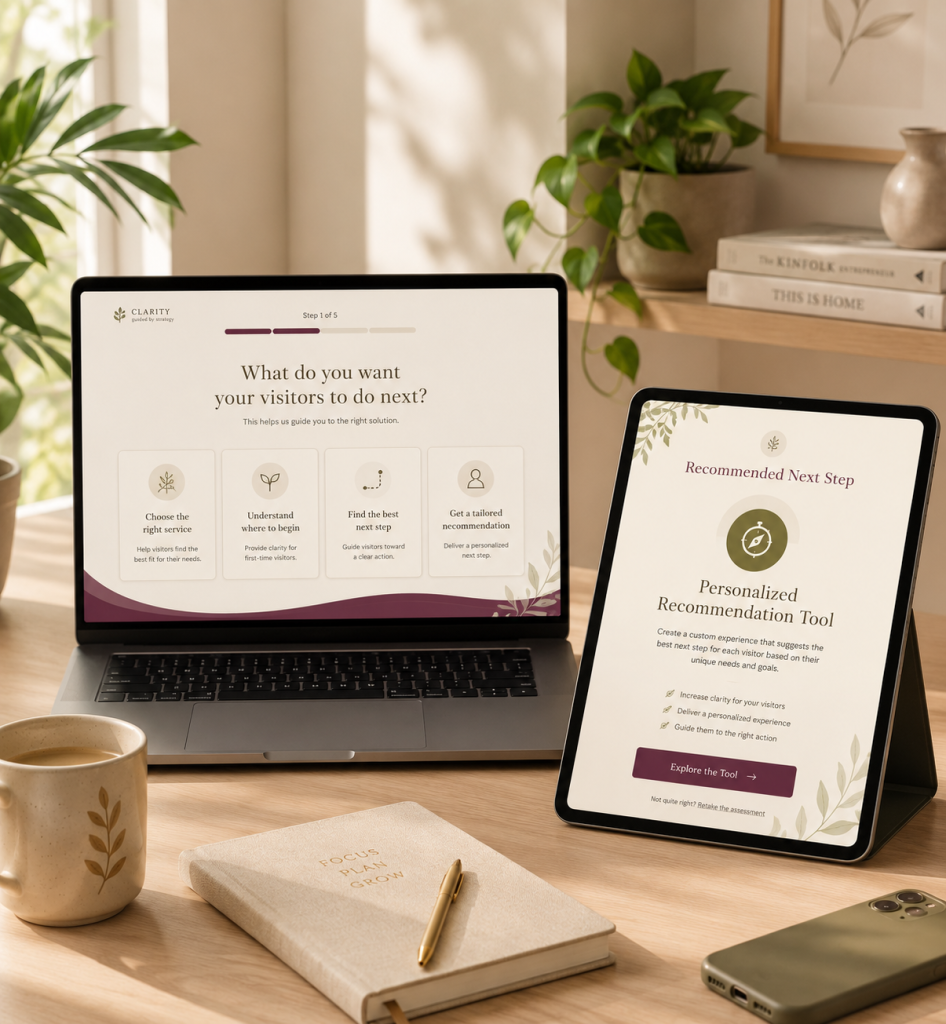
An interactive lead tool creates a guided step between passive browsing and direct inquiry.
Instead of asking the visitor to figure everything out alone, the tool asks relevant questions and helps them move toward a more useful next step.
Depending on the business, a tool might:
- Help someone choose the right service
- Identify what may be causing a problem
- Assess whether they are ready to move forward
- Recommend a product, package, resource, or service
- Estimate a range or possible outcome
- Gather useful details before an inquiry
- Direct different visitors toward different next steps
The experience feels more personal because the result is based on what the visitor actually selected.
A well-planned tool can help someone feel understood while also helping the business receive better information. It can answer some of the early questions that would otherwise have to be handled manually. It can also make follow-up more relevant.
For example, someone who needs help choosing between services should not necessarily receive the same response as someone who already knows what they want but is not ready to begin yet.
The tool does not create interest out of nowhere. It helps guide the interest that is already there.
Four examples of interactive lead tools
Interactive tools can take many forms, but these are four of the most useful starting points for service-based businesses.
Service Match Tool
A Service Match Tool helps visitors determine which service, package, or pathway is the best fit for their needs.
This can work especially well for businesses that offer several services that may seem similar from the outside.
For example, a web professional might offer website support, ongoing management, strategy, and full redesign services.
The business owner understands exactly how those services differ.
The visitor may not.
A Service Match Tool could ask about the current website, the kind of help needed, urgency, budget range, and whether ongoing support is important.
It could then recommend the most relevant option and explain why it fits.
This helps the visitor feel more confident and reduces inquiries for the wrong service.
Diagnostic Assessment
A Diagnostic Assessment helps visitors identify what may be going wrong and where they should focus first.
This works well when people know they have a problem but do not know what is causing it.
A business owner may know their website is not generating enough inquiries, for example, but they may not know whether the issue is:
- Messaging
- Service clarity
- Calls to action
- Trust
- Traffic
- The follow-up process
- The overall client journey
A Diagnostic Assessment can help organize the problem and point them toward a reasonable next step.
Instead of simply telling them, “Your website is not converting,” it helps them understand why that may be happening.
Readiness Assessment
A Readiness Assessment helps visitors understand whether they are prepared to begin a service, project, program, or process.
It can also show them what they may need to complete first.
This is useful when success depends on certain pieces already being in place.
Someone may be interested in building an interactive lead tool, for example, but still need to clarify their services, define what the tool should help visitors do, or decide what follow-up will happen after someone receives a result.
A readiness result can tell them whether they have a clear build path, need some planning, or should begin with strategy first.
That is useful information even when the answer is, “You are not quite ready to build this yet.”
Personalized Recommendation Tool
A Personalized Recommendation Tool uses the visitor’s answers to suggest a specific product, service, resource, or next step.
This can be useful when the best option depends on several different factors.
A coach, for example, may recommend different resources based on the visitor’s goals, current challenges, preferred support style, and level of readiness.
A product-based business may recommend a specific item or collection.
A service provider may direct one person toward a consultation, another toward a smaller offer, and someone else toward a free resource.
A personalized result usually feels more useful than sending every visitor to the same generic page.
When an interactive tool is not the first fix
I build interactive lead tools, but I do not think every website needs one – and I definitely do not think a tool should be added just to make a website feel more impressive. A tool should support a reasonably clear offer and client journey. It should not be used to cover up bigger foundational problems.
An interactive tool may not be the first priority if:
- Your services are still unclear or constantly changing.
- You are not sure who your best-fit client is.
- Your website is broken, difficult to use, or unreliable.
- You have very little relevant traffic.
- You do not know what you want visitors to do next.
- Your offers need to be simplified before they can be recommended.
- You do not have a clear process for responding to leads.
- You are hoping the tool will make up for unclear positioning.
Sometimes the right first step is clearer messaging. Sometimes it is restructuring the services. Sometimes it is improving the website itself. And sometimes, honestly, the answer really is that you need more traffic.
The goal is not to add an interactive feature because it is new or interesting. The goal is to create a clearer, more useful path for the people you want to serve.
When the larger website needs attention first, begin with your messaging, service structure, usability, or the pages supporting the client journey.
What a better lead path can look like
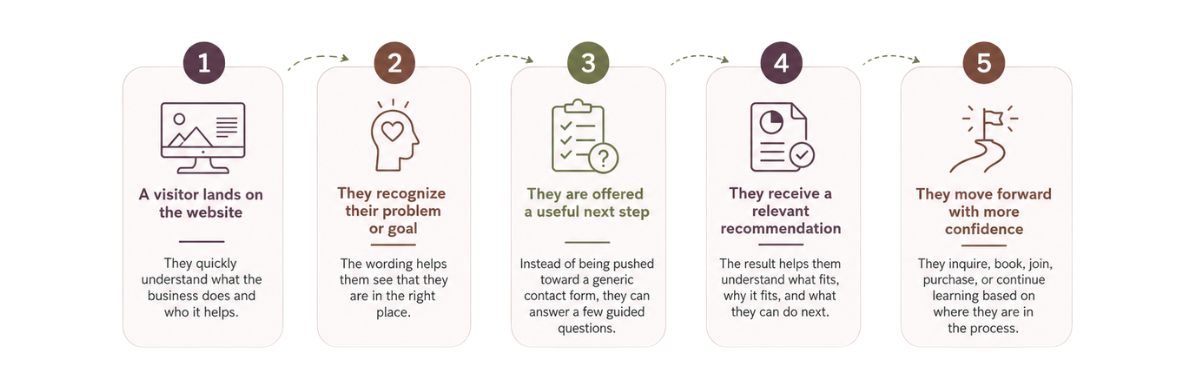
A strong lead path does not have to be complicated.
It may look like this:
01.
A visitor lands on the website
They quickly understand what the business does and who it helps.
02.
They recognize their problem or goal
The wording helps them see that they are in the right place.
03.
They are offered a useful next step
Instead of being pushed immediately toward a generic contact form, they can answer a few guided questions.
04.
They receive a relevant recommendation
The result helps them understand what fits, why it fits, and what they can do next.
05.
They move forward with more confidence
They inquire, book, join, purchase, or continue learning based on where they are in the process.
That creates a better experience for the visitor. It also gives the business a more informed, better-matched lead.
So, what should you fix first?
Start by figuring out where the path is breaking down.
If people do not understand what you offer, work on the messaging.
If they understand the offer but cannot tell which option fits, improve the service pathway.
If they seem interested but are not ready to contact you, create a lower-pressure next step.
If your inquiries are poorly matched, improve the qualification process.
If visitors need help choosing, identifying the real problem, or understanding whether they are ready, an interactive lead tool may be a strong fit.
If the website is clear and the path works but very few relevant people are arriving, traffic generation may genuinely be the next priority.
More traffic can help a website that already guides people well. But sending more people into a confusing or incomplete path usually creates more browsing, not more qualified inquiries. Before you focus only on getting more eyes on the website, look at what happens after someone arrives.
Do they understand what you do?
Do they recognize that it may be for them?
Do they feel guided?
Do they know what to do next?
And does that next step make sense for where they are?
Those answers will often tell you more than the traffic number alone.
Written by Jenni Lynn, founder of Wild Root Web, where she helps service-based businesses create clearer website paths and better-qualified inquiries.
Frequently asked questions about website traffic and leads
Find the right kind of lead tool for your business
If people are reaching your website but not moving forward, the problem may be messaging, the service pathway, the next step – or a missing layer of guidance. You do not need to diagnose it entirely on your own.
Explore which kind of interactive lead tool may fit your business.
Talk through your website, services, and visitor pathway.
Get help with the website or supporting pages that may need attention first.