
When someone asks me whether they should add a quiz to their website, my first question usually is not, “What kind of quiz?” It is: What do your visitors need help figuring out?
Sometimes people hear “website quiz” and picture a personality quiz, a playful result, or a series of questions designed mostly to collect an email address.
A quiz can certainly be that.
But for a service business, it can also be much more practical.
It might help someone choose between services, figure out what may be causing a problem, understand whether they are ready to move forward, or get a recommendation based on what they actually need.
In other words, it can help someone move from:
“I’m interested, but I’m not sure where to begin.”
to:
“I understand what fits and what I should do next.”
That can be useful for the business too. You may get better information before the conversation starts, spend less time answering the same early questions, and have a clearer idea of what someone actually needs.
But I would not add a quiz just because it feels interactive or because quizzes are supposed to be good for lead generation.
If the visitor does not need help making a decision, understanding something, or choosing a next step, the quiz may not have much of a job to do.
That is the part I would figure out first. A good website quiz does more than keep people clicking. It helps them make progress.
Key Takeaways
- A website quiz is most useful when visitors need help choosing, diagnosing, assessing readiness, or deciding what to do next.
- The questions should lead to meaningfully different results, recommendations, or follow-up—not simply collect information.
- A quiz should support an existing website path. It will not fix unclear services, weak messaging, or a lack of relevant traffic.
- The result matters as much as the questions. Visitors should understand what fits, why it fits, and what to do next.
- You do not have to require an email address or turn every quiz result into a sales conversation.
A website quiz can be more useful than it sounds
The word “quiz” covers a lot of ground.
It might be lighthearted and entertaining.
It might help someone identify a type, style, or category.
It might recommend a service, product, resource, or next step.
It might also function more like an assessment, intake tool, calculator, readiness check, or guided decision-making experience.
For a service-based business, the most useful quizzes are often the ones that help visitors answer a real question. That is usually how I think about them: not as quizzes for the sake of interaction, but as a way to help someone work through something they were already trying to figure out.
For example:
- Which service fits my situation?
- What may be causing this problem?
- Am I ready to move forward?
- What should I do first?
- Which option makes the most sense for me?
- What kind of support do I need?
The value does not come from the fact that the visitor is clicking through questions. It comes from what those questions help them understand.
A quiz is simply the format. The real purpose is guidance.
What can a website quiz help visitors do?
A useful website quiz can reduce some of the uncertainty that keeps interested visitors from taking the next step.
Depending on the business, it may help someone:
What can a website quiz help the business do?
A well-planned quiz should also make the inquiry process easier for the business.
It may help you:
- Collect useful context before a conversation
- Understand what the visitor is trying to solve
- Recommend the most relevant service or resource
- Reduce repetitive early questions
- Identify whether someone appears ready to move forward
- Segment leads based on their needs or interests
- Personalize follow-up
- Direct different visitors toward different next steps
- Notice patterns in what potential clients are struggling with
- Receive better-matched inquiries
That does not mean the quiz should quietly collect every possible piece of information. The questions should still feel relevant and proportionate to what the visitor receives in return. The goal is not to interrogate people before they are allowed to contact you. It is to create a better exchange.
I think this is an important distinction because qualification can start sounding very business-centered very quickly. The visitor should be getting something useful from the exchange too.
The visitor receives useful direction. The business receives enough context to respond more thoughtfully.
Signs a website quiz may be a good fit
A quiz may be worth considering when visitors regularly need help understanding, choosing, or preparing before they can move forward.
A lot of these signs show up in ordinary client conversations before anyone thinks, “We need a quiz.” You may notice that you keep explaining the same distinction, asking the same clarifying question, or helping people figure out where they belong.
You may notice:
When a website quiz is probably not the first thing you need
I build interactive lead tools, but I do not think every website needs a quiz.
And I do not think adding one automatically makes a website more useful.
I would rather tell someone to fix the underlying problem first than build a tool that has no clear job to do.
A quiz cannot create clarity that the business itself has not worked out yet. If your offers are unclear, the quiz results will probably be unclear too.
If you do not know what visitors should do next, the tool may simply lead them into another dead end.
Sometimes the first fix is messaging.
Sometimes it is simplifying the services.
Sometimes it is improving the website itself.
And sometimes the answer really is that the business needs more relevant traffic before it needs another conversion tool.
A quiz may not be the first priority if:
- Your services are still unclear or constantly changing.
- You are not sure who the quiz is for.
- You do not know what the result should help someone understand.
- Every answer would lead to the same generic recommendation.
- The website itself is broken, confusing, or difficult to use.
- Very few relevant people are reaching the site.
- You do not have a clear follow-up path.
- You are adding it mainly because another business has one.
- You expect it to create interest that does not already exist.
- The business has not yet worked out the distinctions the quiz would need to make.
And sometimes the business needs more relevant traffic before it needs another conversion tool. When the larger problem may be visibility, messaging, or what happens after someone arrives, it helps to step back and look at the broader website pathway first.
A quiz should support an existing business and website pathway. It should not be used to hide the fact that one does not exist yet – or to skip over the uncertainty visitors may still feel before making the leap into direct contact.
What kind of website quiz should you build?
Not every guided quiz works the same way. The best format depends on what the visitor needs help figuring out.
Service Match Tool
Helps visitors choose between services, packages, programs, or pathways when the differences are not obvious from the outside.
Diagnostic Assessment
Helps visitors identify what may be contributing to a problem when they know something is wrong but are not sure why.
Readiness Assessment
Helps someone understand whether they are ready to begin and what may need attention first.
Personalized Recommendation
Uses several answers to suggest the service, product, resource, package, or next step that fits best.
These four formats can all function as interactive lead tools when the questions, result, and next step are connected to a clear visitor need. For a broader explanation of how the types work, including scoring, branching, results, and integrations, read What Is an Interactive Lead Tool?
Does a website quiz have to collect an email address?
No. A quiz can show the result immediately without requiring an email address.
It can also:
- Show a basic result immediately and offer an expanded result by email
- Make email optional
- Ask for an email only when follow-up is genuinely useful
- Allow the visitor to continue without subscribing
- Offer a related resource after showing the result
- Invite the visitor to save or receive their answers
There are valid reasons to collect an email address.
You may want to send:
- A detailed result
- A personalized explanation
- A relevant guide
- A follow-up recommendation
- A short nurture sequence
- A booking or inquiry option
If you’ll be collecting emails, the visitor should understand what they will receive in return.
A quiz should not ask someone to answer several thoughtful questions and then unexpectedly lock the result behind an email form. That can make the experience feel less like guidance and more like a trade the visitor did not agree to.
Personally, I do not love making someone work through a thoughtful set of questions and then surprising them with a gate before they can see what all that effort produced.
Email capture should support the experience, not become the price of finishing it.
How long should a website quiz be?
There is no perfect number of questions. I would be wary of anyone giving you a universal number here, because a simple service matcher and a nuanced readiness assessment are doing very different jobs.
The better question is whether each question earns the effort it asks from the visitor.
If a question changes the result, recommendation, explanation, qualification, follow-up, or next step, it may belong. If removing it would change absolutely nothing, I would question why the visitor needs to answer it.
A question should affect at least one of these things:
- The result
- The recommendation
- The explanation
- Qualification
- Follow-up
- The next step
A longer quiz can still feel manageable when:
- The questions are easy to understand
- The response options are relevant
- The visitor can see their progress
- The design works well on mobile
- Similar questions are grouped naturally
- The quiz does not ask the same thing several different ways
- The result feels worth the effort
A short quiz can still feel frustrating when the questions are vague, repetitive, or disconnected from the result. Length matters – but relevance matters more.
The quiz should also be easy to use
A useful quiz should work with a keyboard, use readable text and clear contrast, avoid relying on color alone, and make answer options easy to select on both desktop and mobile.
Visitors should also be able to understand their progress, correct an answer when appropriate, and move through the experience without unnecessary animation or confusion.
What makes a website quiz result useful?
The result is where the quiz either becomes valuable or falls apart. A visitor has given the tool their attention, answers, and possibly their contact information.
At that point, I think the business owes them something genuinely useful in return.
A useful result may include:
A clear recommendation or finding
Tell the visitor what the result is.
Do not make them search through several paragraphs to find the answer.
Why the result fits
Explain which patterns in their answers led to the recommendation. This is one of the easiest ways to make the result feel less generic. People should be able to recognize themselves in the explanation.
The result should feel connected to what they actually said.
What it helps them understand
A result should add clarity.
It may explain why a certain service fits, what may be causing a problem, how ready they appear to be, or what priority deserves attention first.
Any important limitations
A quiz is not always a substitute for professional review, diagnosis, strategy, or a real conversation.
I would rather have a tool be clear about the edge of what it can determine than make the result sound more certain or intelligent than it really is.
The most relevant next step
Tell them what to do with the information.
That could be:
- Visit a service page
- Read a related resource
- Prepare a few missing pieces
- Request a quote
- Complete a guided inquiry
- Book a fit session
- Reply to an email
- Continue exploring
Enough substance to feel worthwhile
A vague result such as:
You are a visionary.
may be entertaining, but it does not necessarily help someone make a decision.
A result does not have to be extremely long.
It does need to be useful.
The best quiz results help the visitor leave with more clarity than they had when they arrived.
What should happen after someone completes the quiz?
A quiz should connect to a larger path. This is one of the places I think a lot of otherwise-good quizzes fall apart. So much attention goes into the questions and result that nobody really plans what the person is supposed to do afterward.
It should not end with: Thanks for taking the quiz! and then leave the visitor with nowhere meaningful to go.
Someone who is ready to move forward should not necessarily receive the same follow-up as someone who still needs clarity.
Someone who is not a good fit should not be pushed toward the same sales conversation as everyone else.
This is where the quiz becomes part of the client journey instead of an isolated interactive feature.
Depending on the result, the next step might be:
- A relevant service page
- A personalized email
- A resource or guide
- A booking option
- A guided contact form
- A fit session
- A recommendation to prepare something first
- A lower-pressure email sequence
- A human review of the answers
A decorative quiz and a useful lead tool are not the same thing
The difference is whether the experience has a real job to do. I am not against fun or interactive elements on a website. I just would not confuse engagement by itself with helping someone make a decision.
The difference is not whether the tool is technically called a quiz.
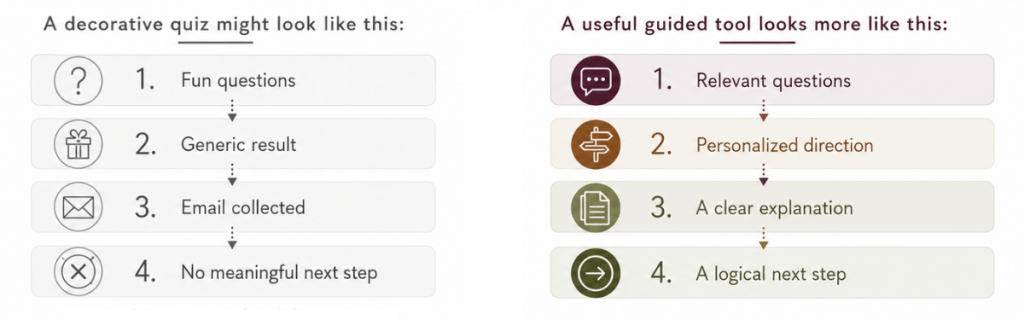
A decorative quiz might look like this:
Fun questions
→ Generic result
→ Email collected
→ No meaningful next step
It may create a few clicks. It may even get shared.
But it does not necessarily help the visitor or the business move forward.
A useful guided tool looks more like this:
Relevant questions
→ Meaningfully different result
→ Clear explanation
→ Appropriate next step
→ Relevant follow-up
The visitor leaves with a better understanding of what fits, why it fits, and what they can do next. The business receives useful context and a clearer opportunity to follow up appropriately.
Questions to answer before adding a quiz
This is the part I would work out before opening a quiz builder or worrying about design. The technology is usually the easier part.
Ask:
What do visitors struggle to decide?
Do they need help choosing, diagnosing, preparing, prioritizing, or finding the right recommendation?
What should the quiz help them understand?
The result should solve a specific information or decision problem and leave the visitor with more clarity about what fits, what matters most, or what they should consider next.
Can different answers lead to meaningfully different results?
If every path leads to the same generic recommendation, the quiz may not need to exist.
What happens after the result?
Decide where each type of visitor should go next, what action makes sense from there, and how the result connects to a useful service, resource, follow-up, or next step.
What recommendation can you confidently provide?
The result should be something the business can reasonably support and explain.
What information does the business actually need?
Do not collect details simply because you can. Every question should serve the result, qualification, or follow-up. More data is not automatically more useful. If you are not going to use the answer to change something about the experience or response, you may not need to ask for it yet.
Does the quiz support an existing service pathway?
The tool should fit into the business and connect naturally to your services, resources, or next steps.
What outcomes will you measure?
Decide which actions or improvements would show that the quiz is helping the visitor and the business.
How will you know whether it is working?
A quiz can look polished and still fail to improve the path.
I would care much more about whether the tool is helping people move forward than whether a lot of people start it.
Strategy matters more than the software.
Useful measures might include:
- Quiz starts
- Completion rate
- Result distribution
- Email opt-ins
- Clicks to recommended pages
- Inquiries
- Bookings
- Lead quality
- Replies to follow-up emails

So, should you add a quiz to your website?
A quiz may fit when visitors need help
- Choosing
- Diagnosing
- Assessing readiness
- Clarifying priorities
- Receiving a recommendation
- Finding the next step
It may not be the first move when
- Services are unclear
- The audience is unclear
- Results would be generic
- The follow-up path is missing
- Relevant traffic is extremely limited
The best website quizzes help the right visitor leave with more clarity than they had when they arrived.
They can also give the business better context, reduce repetitive early questions, personalize follow-up, and improve the quality of the inquiry.
But a quiz is only useful when it has a clear job to do. If the services, audience, results, or follow-up path are still unclear, those may need attention first.
Written by Jenni Lynn, founder of Wild Root Web, where she helps service-based businesses create clearer website paths and better-qualified inquiries.
Frequently asked questions about website quizzes
Figure out what kind of guidance your website actually needs
If visitors need more help choosing, understanding, or preparing before they reach out, an interactive lead tool may be one way to support that path.
The Find My Best-Fit Tool assessment can help you explore which format may make sense.
If the website itself needs attention first, Website Services may be the better starting point.
If you are not sure whether the problem calls for an interactive tool at all, that is okay too. A Tool Fit Session gives us a chance to look at where visitors are getting stuck and talk through what would actually make sense before you build anything.
Explore which kind of interactive lead tool may fit your business.
Talk through your website, services, and visitor pathway.
Get help with the website or supporting pages that may need attention first.